

You can identify high-converting buyer queries with High Intent Keyword Research, build high-converting landing pages through Website Page Optimization, earn media features via Digital PR Authority Acquisition, eliminate backend errors using Enterprise Technical Infrastructure, and secure conversational answer citations with Generative AI Engine Visibility.
However, all of these technical and strategic milestones mean nothing if you cannot answer one fundamental question:
How much revenue did organic search generate for your business this quarter?
Why do traditional SEO reports leave executives disappointed?
They fail because standard agency reports focus on vanity metrics. You receive 30-page PDF reports filled with impression graphs, total ranking counts, and general traffic spikes, but zero clarity on closed-won deals, sales pipeline growth, or actual revenue generated.
Through my hands-on work as a freelance SEO expert, I eliminate reporting fluff. I establish transparent revenue tracking and pipeline measurement systems that connect every keyword, content piece, and technical fix directly to sales outcomes.
Here is how to replace vanity metrics with clean pipeline tracking, accurately attribute organic leads, and calculate the true return on investment (ROI) of your search campaigns.
What Is Transparent Revenue & Pipeline Tracking in SEO?
At its core, transparent revenue tracking is the process of connecting web search traffic and organic form fills to your customer relationship management (CRM) database and financial accounting tools.
Traditional Vanity Reporting (No Business Context)
└── Impressions ➔ Keyword Rank Graphs ➔ Unqualified Clicks (Zero Revenue Insight)

Transparent Revenue & Pipeline Tracking (Business ROI)
└── Organic Session ➔ High-Intent Form Lead ➔ Qualified CRM Deal ➔ Closed-Won Revenue
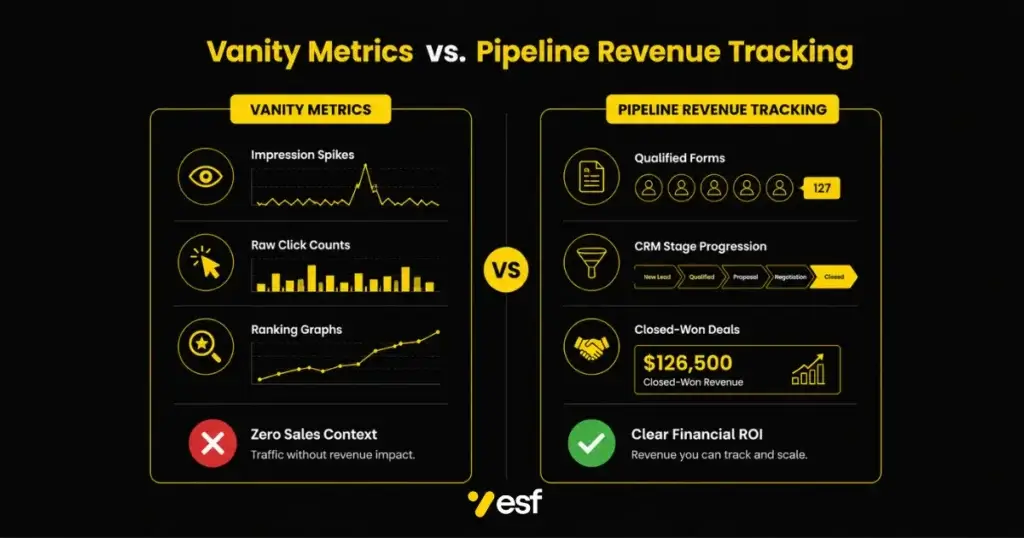
Instead of celebrating arbitrary traffic increases from low-intent informational terms, transparent revenue tracking evaluates search performance based on bottom-line financial indicators:
- Qualified Pipeline Value: The total dollar value of sales opportunities opened from organic search visits.
- First-Touch & Multi-Touch Attribution: Clear tracking showing which landing pages brought high-ticket clients into your sales funnel.
- Closed-Won Revenue: Direct revenue generated from deals originating through organic search channels.
- Customer Acquisition Cost (CAC) Reduction: Measuring how organic lead flow lowers overall client acquisition costs compared to paid search campaigns.
Whether you run a B2B SaaS company, a corporate advisory firm, or a regional service operation, transparent revenue tracking provides complete financial clarity on your search marketing investments.
Why Vanity Metrics Mislead Business Owners
Ranking number one for a high-volume keyword feels great, but if those visitors never convert into paying customers, that traffic represents an operational expense rather than a business asset.
Without a dedicated transparent revenue tracking setup, traditional SEO metrics cause three main problems:
1. High Search Impressions with Zero Sales Pipeline
Informational queries often generate massive traffic spikes without driving actual revenue. If reports focus solely on total session counts without tracking lead qualifications, marketing teams waste time creating content that never attracts real buyers.
2. Disconnect Between Marketing and Sales Data
Web analytics platforms track web sessions, while sales teams work inside CRM software like HubSpot or Salesforce. Without direct data integration, marketing claims credit for leads that sales reps dismiss as unqualified.
3. Misallocated Marketing Budgets
Without accurate attribution, business owners struggle to determine which services, landing pages, or technical campaigns yield the highest profit margins, leading to wasted marketing spend on low-converting channels.
The 4-Step Framework for Transparent Revenue & Pipeline Tracking
To bridge the gap between organic search activity and closed revenue, I implement a straightforward four-part reporting framework.
Step 1: Configuring Custom Conversion Goal Architecture
We replace basic pageview goals with multi-step conversion events across your website forms, dynamic call tracking systems, and booking platforms:
- High-Intent Form Submissions: Tracking consultation requests, quote forms, and direct demo requests separately from basic newsletter signups.
- Dynamic Phone Call Attribution: Assigning unique tracking numbers to organic search sessions to capture phone leads accurately.
- Interactive Tool & Audit Conversions: Measuring engagement with custom calculators or automated audit forms.
Step 2: Integrating Website Analytics with CRM Systems
To track leads through your entire sales cycle, we connect web analytics data directly to your CRM platform:
User Session (Organic Search)
   └── Captures First-Touch Source & First Landing Page
          └── Passes Hidden UTM Parameters into CRM Form Submission
                 └── Maps Lead to CRM Deal Stage (Discovery ➔ Quote ➔ Closed-Won)
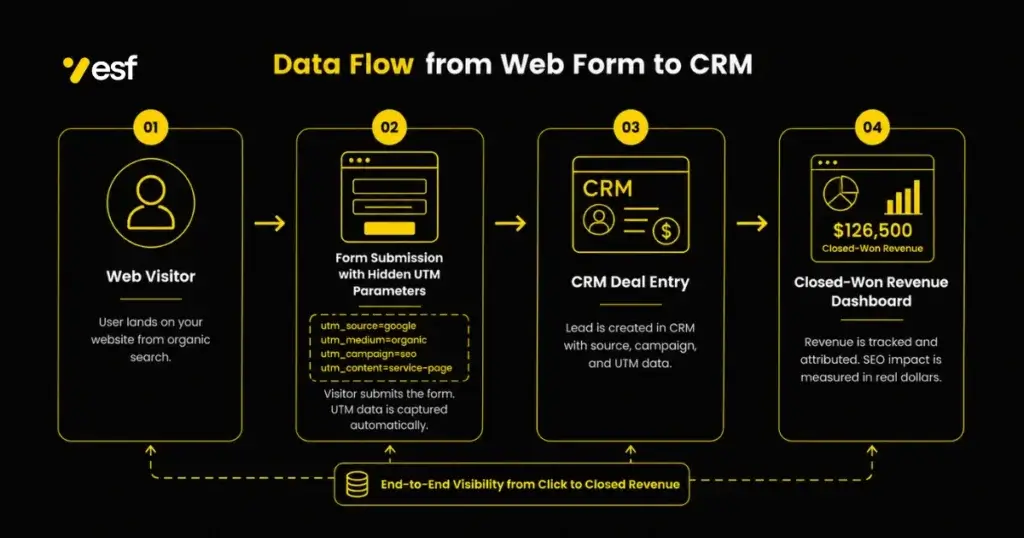
By mapping analytics data to CRM custom properties, you can trace closed-won deals back to the specific landing page and keyword topic that attracted the prospect. For detailed setup guides on multi-touch model configurations, review the HubSpot Revenue Attribution Reporting Documentation.
Step 3: Establishing Clear Multi-Touch Attribution Models
B2B buying cycles often involve multiple touchpoints across several weeks. We implement structured attribution models to evaluate content performance across every stage of the funnel:
| Attribution Model | Primary Purpose | Best Used For |
| First-Touch Attribution | Credits the initial landing page that brought the user to your site. | Top-of-funnel guide & brand discovery evaluation. |
| Last-Touch Attribution | Credits the final landing page visited immediately before form conversion. | Bottom-of-funnel service page evaluation. |
| Multi-Touch / Linear | Distributes revenue credit across all organic touchpoints in the customer journey. | Complex enterprise B2B sales cycles. |
If you manage dynamic web assets or custom client portals, my guide on WordPress SEO Services explains how clean database tags and form integrations pass clean parameter data into sales pipelines.
Step 4: Delivering Live Executive Dashboards
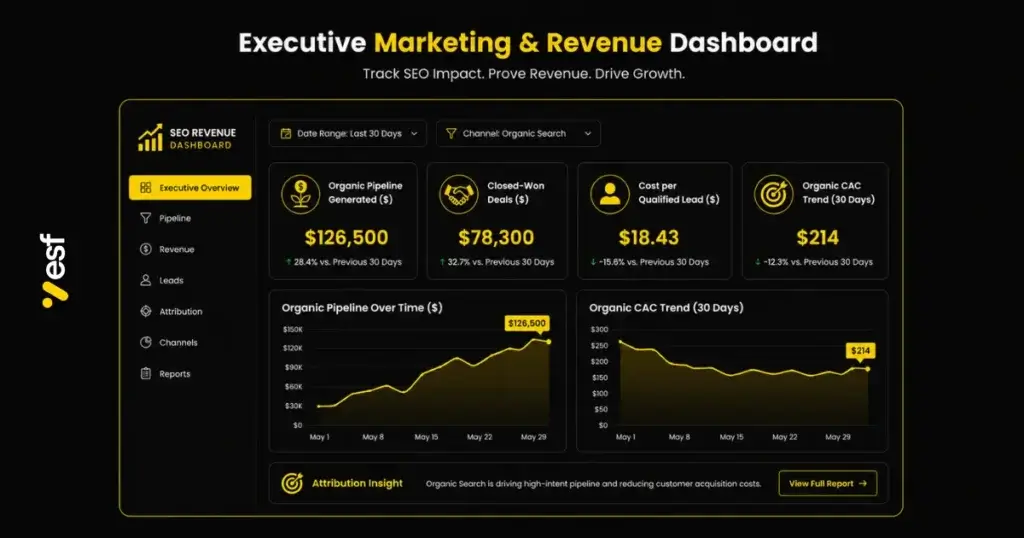
Instead of sending static PDFs at the end of the month, we build live, scannable executive dashboards that display key financial metrics in real time:
- Total Organic Pipeline Generated ($)
- Cost Per Qualified Organic Lead ($)
- Closed-Won Organic Revenue ($)
- Average Deal Size by Organic Landing Page ($)
For field service companies looking to connect local search rankings with phone calls and booked service calls, my Local SEO Consultant page details how local call tracking connects map visibility directly to booked jobs.
Sector-Specific Tracking Models
Revenue tracking models must adapt to your specific business model and sales cycle length. Here is how we build transparent revenue tracking systems across four key sectors:
1. B2B SaaS & Technology Platforms
- Sales Pipeline Goal: Demo requests, free trial starts, and enterprise contract signups.
- Tracking Architecture: GA4 event tracking integrated with CRM pipeline stages to monitor Monthly Recurring Revenue (MRR) expansion.
- Key Metric: Customer Lifetime Value (LTV) relative to Organic CAC.
2. Professional Services (Legal, Financial & Corporate Advisory)
- Sales Pipeline Goal: Retainer consultations, case evaluations, and strategy calls.
- Tracking Architecture: Form parameters combined with dynamic call tracking linked directly to practice management software.
- Key Metric: Pipeline value generated per legal or financial service category.
3. Commercial Trades & Industrial Manufacturing
- Sales Pipeline Goal: Bulk product quote requests and commercial service bids.
- Tracking Architecture: Custom quote form parameter tracking synced with ERP deal pipelines.
- Key Metric: Closed-won bid value originating from organic search landing pages.
4. Specialized Health & Clinical Operations
- Sales Pipeline Goal: Patient appointments, procedure bookings, and specialist consultations.
- Tracking Architecture: Privacy-compliant booking goal tracking connected to patient scheduling systems.
- Key Metric: Cost per booked procedure and overall clinic revenue growth.
Comparing Vanity Metrics vs. Pipeline Metrics
To ensure your SEO strategy remains focused on business growth, replace vanity indicators with actionable pipeline metrics:
| Vanity SEO Metric | Why It Lacks Context | Pipeline Revenue Metric | Why It Drives Growth |
| Total Keyword Ranks | Tracks rank positions for non-buying queries. | Qualified Search Pipeline ($) | Measures actual dollar value added to your sales funnel. |
| Total Organic Impressions | Shows how often your link appeared on a SERP. | Organic Form & Call Conversions | Tracks actual prospect engagements and sales inquiries. |
| Raw Page Traffic | Includes bot visits, bounce clicks, and low-intent readers. | Closed-Won Organic Revenue ($) | Calculates real cash return on marketing spend. |
| Total Backlink Counts | Focuses on link quantity over domain relevance. | Customer Acquisition Cost (CAC) | Demonstrates how organic search lowers overall acquisition costs. |
Frequently Asked Questions
What is transparent revenue tracking in SEO?
Transparent revenue tracking is the practice of setting up analytics, call tracking, and CRM integrations so you can attribute qualified sales leads, pipeline opportunities, and closed-won revenue directly to your organic search campaigns.
Why are traditional SEO monthly reports insufficient for business decisions?
Traditional monthly reports usually focus on vanity metrics like total impressions, raw session counts, and keyword ranking charts. They fail to show whether those search visitors converted into qualified leads, sales calls, or closed revenue.
How do you track revenue for long B2B sales cycles?
For complex B2B sales cycles, we pass hidden web source parameters (UTMs and landing page URLs) into your CRM when a lead submits a form. As that deal progresses through discovery, quote, and closed-won stages over several months, the CRM maintains full attribution to the original organic touchpoint.
What tools are required for transparent pipeline tracking?
A typical revenue-tracking setup uses Google Analytics 4 (GA4), Google Tag Manager (GTM), dynamic call-tracking software (such as CallRail), and a CRM platform (such as HubSpot, Salesforce, or Zoho).
Can small local businesses track revenue from SEO?
Yes. Local businesses can track revenue by combining online booking form goals with dynamic phone call tracking, connecting phone calls and form submissions directly to monthly sales records.
How does pipeline tracking help optimize future SEO strategy?
Pipeline tracking reveals which specific landing pages and keyword topics generate the highest-margin clients. This data allows us to double down on high-converting topics while scaling back effort on pages that generate low-quality traffic.
Ready to See Real Revenue Impact from Your SEO Strategy?
Stop relying on confusing agency reports filled with vanity graphs. It is time to track real business outcomes with full visibility into rankings, lead flow, and pipeline growth.
If you are ready to implement transparent revenue tracking across your organic search channels, let us review your analytics and CRM infrastructure together:
- Get a Free Technical & Analytics Audit: Visit my page to get a free SEO audit. I will evaluate your current goal tracking, inspect conversion paths, and share clear pipeline attribution ideas within 24 hours.
- Train Your In-House Team on Conversion Tracking: If you want to train your internal team to build executive marketing dashboards, explore my 1 on 1 SEO Training for Local Business Owners.
- Work Directly with an Expert Strategist: Learn more about my client case studies and hands-on optimization methodology by visiting my page to hire an SEO expert.
Action Checklist for Transparent Revenue Tracking
[ ] Audit existing Google Analytics 4 goals to eliminate non-business conversion tracking.
[ ] Add hidden source and landing page fields to all website lead forms.
[ ] Integrate website forms directly with your CRM software to capture lead source data.
[ ] Deploy dynamic call tracking to capture phone calls originating from organic search.
[ ] Establish a multi-touch or last-touch attribution report inside your CRM.
[ ] Build an executive dashboard displaying monthly organic pipeline ($) and closed-won revenue ($).