
Local SEO Checklist for Small Businesses: What to Fix First and in What Order
A local SEO checklist has 6 parts: your Google Business Profile, your name, address and phone details, your reviews, your website pages, a few local links, and tracking. Work through them in that order. In my 10+ years in SEO, the first 2 parts fix the biggest problems on most small business listings I look at.
If your phone is quiet while a competitor with a worse website keeps showing above you in the map, the website is rarely the cause. The cause is usually the everyday setup around it: a half-filled profile, listings that disagree with each other, and reviews nobody asked for. None of it is glamorous, and all of it can be fixed.
This guide is the order I follow myself. It is for owners who want to do the work themselves, and for anyone who wants to check what a consultant should be doing for them. Each part tells you what to do, why Google cares and which mistake to avoid. The deeper detail on the profile itself is in my Google Business Profile optimization guide, so here I keep that part short.
Key takeaways
Local results depend mainly on relevance, distance and prominence, and you can change relevance and prominence.
Your primary category and your business name are the 2 profile settings that matter most.
Matching name, address and phone details on every listing matters more than adding new listings.
Ask every customer for a review, and reply to every review.
Give each main service its own page, and measure calls and enquiries, not only rankings.
In this guide
How does Google decide who shows in the map pack?
Google says local results are based mainly on 3 things: relevance, distance and prominence. Knowing which of the 3 you can change tells you where to spend your time.
Factor | What Google means by it | What you can change |
|---|---|---|
Relevance | How well your profile matches what the person searched for | Categories, services, description, and the pages on your website |
Distance | How far you are from the person searching | Very little. It is set by your address, or by your service area if you travel to customers |
Prominence | How well known your business is, based on reviews, links, articles and directories across the web | Reviews, listings, links and mentions |
Google also says that review count and review score count towards local ranking, and that your position in normal web results is a factor, so ordinary SEO helps too. It also says there is no way to request or buy a better local ranking. I like that last point. Anyone selling a "guaranteed map pack position" is promising something Google says nobody can sell you.
Distance is mostly fixed, so the rest of this checklist works on relevance and prominence. That is where an ordinary business can win.
Part 1: Fix your Google Business Profile first
For most local searches, the profile is the first thing customers see, so it comes first. If you have not claimed and verified it yet, do that today. Verification tells Google you are allowed to represent the business, and if an old agency or a former employee set the profile up, get ownership back before you change anything else.
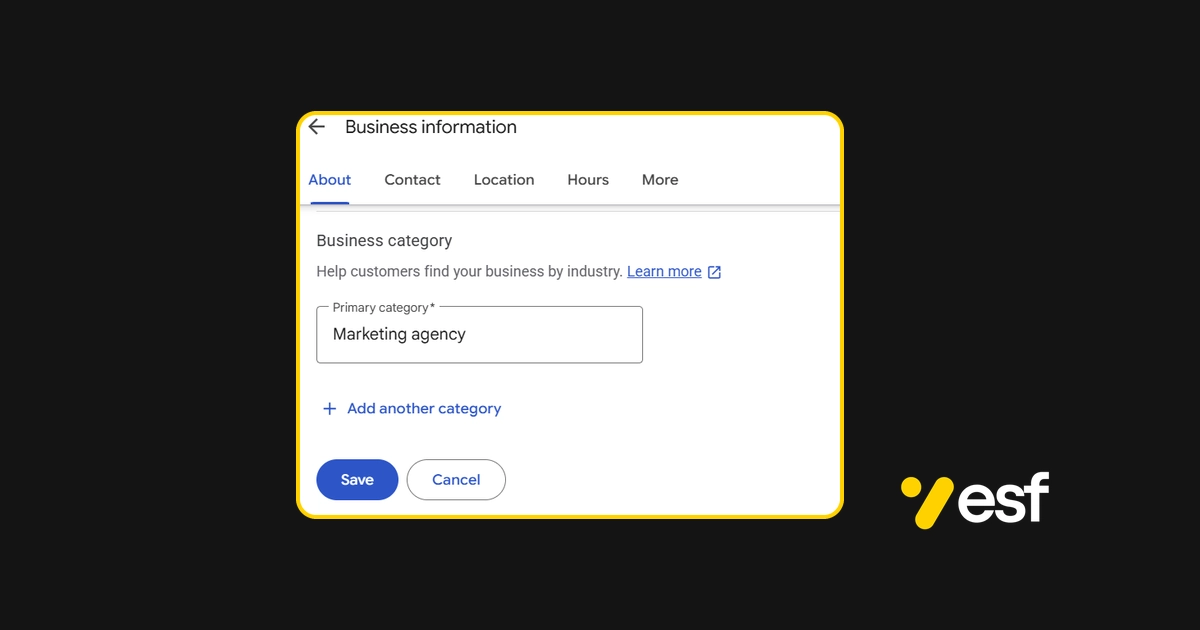
Choose the right primary category
This is the first setting I check on every profile. Google's guidelines tell you to choose the fewest categories needed to describe your core business. So pick the category that matches the main thing customers hire you for, not the one that sounds biggest. A business that mainly repairs laptops should not pick a broad shop category because it looks more impressive. Add secondary categories only for services you actually offer.
Use the name on your sign
Use the name on your sign, your invoices and your paperwork. Adding the town or a service to the name looks like a cheap way to rank, and it is one of the quickest ways to get a profile suspended. A suspension can take a profile off Google for weeks, which costs far more than the trick could ever gain.
Set the rest of the profile
Address or service area. If customers visit you, show your address. If you travel to them and nobody visits you, hide the address and list the areas you cover (Google allows up to 20). A virtual office or a mailbox you do not work from is not an eligible address.
Services. List each one with a short description, in the words a customer would use.
Description. You get 750 characters. Say what you do, who for and where, in normal sentences, with no phone number, web address or keyword list.
Hours and contact details. Match your website footer, add holiday hours, and update them when they change.
Photos. Your own work, team and premises, plus a logo and a cover photo. Add a few each month.
Posts. Use them for offers, finished jobs and news. I treat them as a way to keep the profile fresh, not as a ranking trick.
You may still see old guides telling you to add your own questions and answers to the profile. Google has been phasing that section out, so skip it. Each of the items above is explained field by field in the profile guide.
Part 2: Make your name, address and phone number match everywhere
This is called NAP. Google compares what it finds about your business across the web, and when the details disagree, it trusts all of them a little less. Fixing this is dull work, and it pays off in how sure Google is about who you are.
Where to check | Why it matters |
|---|---|
Your website footer and contact page | This is the version everything else should match |
Google Business Profile | The listing most customers see first |
Feeds Bing and other services that use Bing data | |
Controls how you show on Apple Maps | |
Your Facebook page | Often the first thing people check after Google |
Directories for your trade or industry | Where customers and Google look for proof that you are a business in your field |
How to clean it up
Write down 1 master version of your name, address and phone number. Use it exactly.
Search your phone number in quotes on Google. Search your business name and any old address too. Note every listing that appears.
Compare each one with your master version.
Fix the ones you can log in to. For duplicates and old listings, ask the directory to merge or remove them.
Recheck once a month. It takes 10 minutes.
Small differences like "Street" and "St" rarely matter. A different phone number, an old address or a duplicate listing does.
Part 3: Ask for reviews and reply to every one
Reviews are the part of prominence you influence most over time, and Google says review count and score are factored into local ranking. They also decide whether a stranger picks you or the next business down the list.
Get your direct review link from your profile and send it by text or email right after a job.
Ask every customer, not only the ones you expect to be happy. Choosing only happy customers is called review gating, and Google does not allow it.
Never pay for reviews, offer discounts for them or write them yourself. The Business Profile policies overview links to the full rules.
Reply to every review. Keep good replies short and warm, and keep replies to bad reviews calm and factual.
The message to send, with reply examples, is in how to get more Google reviews.
Part 4: Give your website pages that match what people search
Your profile gets you into the map. Your website is what convinces people once they click, and it is part of how Google judges relevance. Most small business sites I look at have 1 page called "Services" with everything on it. That is the biggest thing to fix.
1 page for each main service
Give each main service its own page, with the service and your area in the title and the first paragraph. Say what the service includes, who it suits, where you work, how it goes from first call to finished job, what affects the price, and how to book. Add photos of jobs you have done. A page that answers the questions a customer would ask on the phone beats a page packed with keywords.
Area pages only when you serve the area
Build a page for an area only if you serve it, and only if the page says something the others do not, such as local jobs, local details or customer feedback from that area. Copied pages with only the town name swapped do more harm than good.
Choose the right words
People who are ready to hire search differently from people who are browsing. My guide to high intent keyword research shows how to pick the phrases that bring in buyers, and website page optimization strategy shows how to improve pages that already exist.
Make calling easy
Put a call button at the top of every page, and check it works on a phone. Add a map and your opening hours on the contact page. Use the same name, address and phone number as your profile. If your site runs on WordPress, my WordPress SEO services page explains how a clean setup makes all of this easier.
Add local business schema
Schema is code that tells search engines the facts about your business in a form they can read. Local business schema with your name, address, phone number and opening hours helps search engines and AI tools understand who you are. Most SEO plugins on WordPress can add it.
Part 5: Earn a few local links
Links and mentions from other sites feed prominence. For a local business, a handful from local sources beats a package of hundreds that were bought. Good places to start:
Your local chamber of commerce or business group
The local paper or community news site
Suppliers and partners who can list you
A local team, school event or charity you sponsor
Trade bodies and accreditation schemes you belong to
If a quote promises hundreds of links for a small fee, walk away. Those links rarely help and can cause problems. If you want to go further on earning strong mentions, my guide to digital PR and authority building covers it.
Part 6: Track what matters
Write down your starting numbers before you change anything. Without a baseline, you cannot tell what worked. Check these each month:
What to track | Where to find it | What it tells you |
|---|---|---|
Calls from your profile | Profile performance report | Whether the profile is bringing in work |
Direction requests | Profile performance report | Whether people plan to visit |
Website clicks from the profile | Profile performance report | How many people want to know more |
Searches that find your site | Google Search Console | Which phrases bring people to your pages |
Form enquiries and calls from the site | Your form emails and call log | Whether visits turn into business |
Review count and average rating | Your profile | How you compare with competitors |
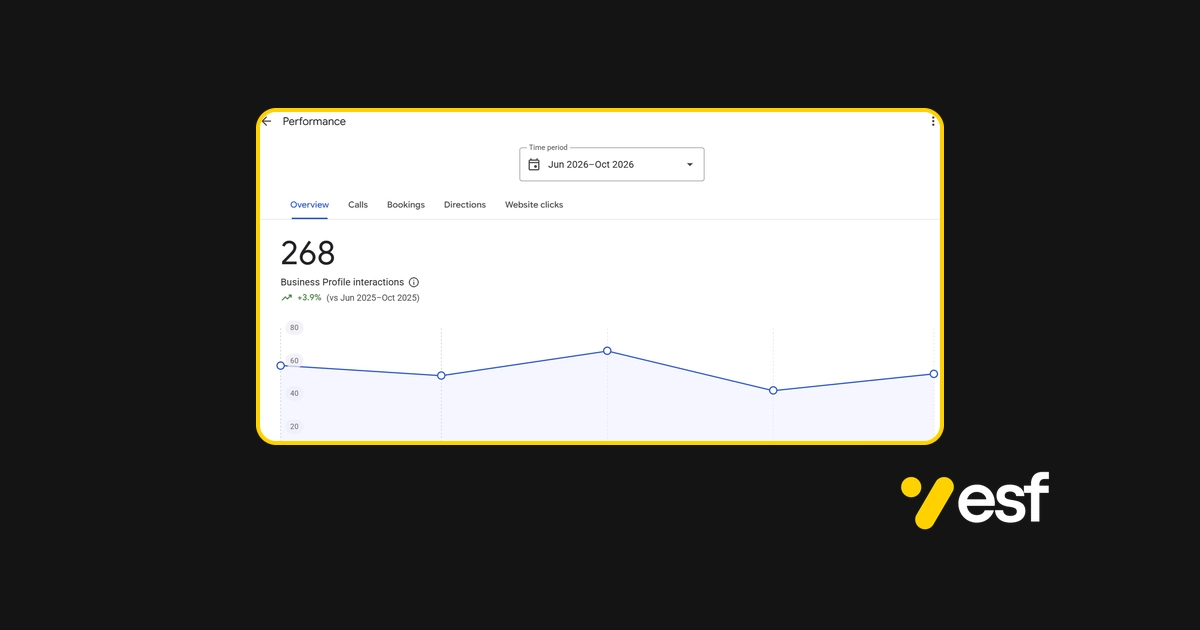
Check again after 8 to 12 weeks. Calls and direction requests usually move before rankings do, so do not judge only by where you appear. To tie these numbers to revenue, read transparent revenue tracking.
Mistakes that cost small businesses the most
Mistake | Why it hurts | The fix |
|---|---|---|
Keywords or the town added to the business name | Can get the profile suspended | Use the name on your sign |
A virtual office or mailbox as the address | Not an eligible address, and a common reason for suspensions | Use an address you work from, or hide it and list service areas |
Different phone numbers on different listings | Google trusts the details less | Use 1 master version everywhere |
Copied city pages with only the town changed | Thin pages that add nothing | 1 page per area you serve, with local detail on each |
Bought or fake reviews | Reviews can be removed and the profile can be penalised | Ask customers who bought from you, every time |
No baseline numbers | You cannot tell what worked | Record calls, directions and enquiries first |
How long does a local SEO checklist take to work?
Local and Google Business Profile work often shows movement in 8 to 12 weeks. Wider organic growth builds over 3 to 6 months. How fast it goes depends on how crowded your area is, what state your profile and site are in today, and how many competitors are working on theirs. Nobody can honestly promise a position, and I never do. What I can say is that doing the 6 parts in this order removes the most common reasons a business stays out of the map.
Should you do this yourself or hire help?
Parts 1 to 3 are very doable on your own, and they cost nothing but time. The hard part is not the first week. It is doing it every month: replying to reviews, adding photos and keeping listings correct when you are busy running the business.
If you do hire someone, ask 5 questions before you pay: what is delivered each month, who does the work, what the report looks like, how long the contract is, and whether they guarantee page 1. If the last answer is yes, walk away. My guide to what SEO costs explains what each price level should include. And if you are still deciding whether your business needs local or national SEO, read local SEO vs national SEO.
The checklist
Claim and verify your Google Business Profile.
Set 1 accurate primary category, and add secondary ones only for services you offer.
Use the name on your sign, with nothing added.
Set your address, or hide it and list your service areas.
List every service and write a 750 character description.
Add photos of your own work, and a few more each month.
Write down 1 master version of your name, address and phone number.
Find and fix every listing that does not match it.
Send your review link to every customer, and reply to every review.
Build 1 page for each main service, and area pages only for places you serve.
Earn a few local links from local sources.
Record your starting numbers, and check them every month.
How we can work together
Get a free mini audit. Send me your website address on the contact page and tell me what you want more of: calls, bookings or sales. I will take a look and reply with 1 honest observation, with no pressure.
Learn to do it yourself. My SEO training for local business owners is 8 hours of 1 to 1 training over 4 weeks.
Have the profile handled. Google Business Profile management is $50, $100 or $200 per month.
Have the whole local plan handled. My local SEO consultant service runs on fixed monthly packages from $299. They are separate services with separate prices, so you only pay for what you need. Everything is month to month, with no setup fee.
You can also see what this looked like for a business that reached #1 in the Local 3-Pack for 7 repair keywords in Ilford, in the Compushop case study.
Frequently asked questions about a local SEO checklist
What should I do first if I only have 1 hour?
Check your primary category, your business name and your phone number on the profile, then send your review link to the last 5 customers you served. Those 3 checks and 1 message cover the settings that cause the most damage when they are wrong.
How often should I go through this checklist?
Do the full pass once, then a short check every month: new reviews, new photos, hours, and your tracking numbers. Go through the whole list again every 6 months or when something changes, such as a new address, phone number or service.
What is the difference between this checklist and the Google Business Profile guide?
This checklist covers the whole local setup, from profile to website to links, in the order I would do it. The Google Business Profile guide goes deep on the profile only, field by field, including what to do if it is suspended.
Do I need a website to rank locally?
A profile can appear without one, but a site with service pages supports the profile and gives customers more reason to call. Google also says your position in normal web results is a factor in local ranking, so a good site helps. I would build at least a basic one.
How much does local help cost?
Doing it yourself costs nothing but time. If you want help with the profile only, my GBP management plans are $50, $100 or $200 per month. If you want the website, content and links handled too, the fixed SEO packages are $299, $699 and $1,499 per month. All are month to month with no setup fee.
Do I need a physical shop to use local SEO?
No. If you travel to customers, you can hide your address and list the areas you serve. You still get a profile and can appear in the map for those areas, as long as you follow Google's rules for service-area businesses.
Does this checklist help me show up in AI answers?
It helps. AI tools and Google's AI features answer local questions from the same business details and reviews that are already online, so accurate listings, a complete profile and good reviews are the groundwork. I cannot promise to be named in any particular AI answer, but a business with consistent, complete information is easier for those tools to use. My guide to generative engine visibility goes deeper on that.

Freelance SEO consultant based in Faisalabad, Pakistan. I do the work myself for local and B2B businesses in the US, UK, Australia, Canada, the UAE and Europe, from local SEO and Google Business Profile management to WordPress and B2B SEO.
I do this work personally for local and B2B businesses. See the local seo service, compare fixed price packages, or ask for a free review of your site.